
.png)
Description
Download Push by Zapier – Chrome extension for instant workflow monitoring
Overview
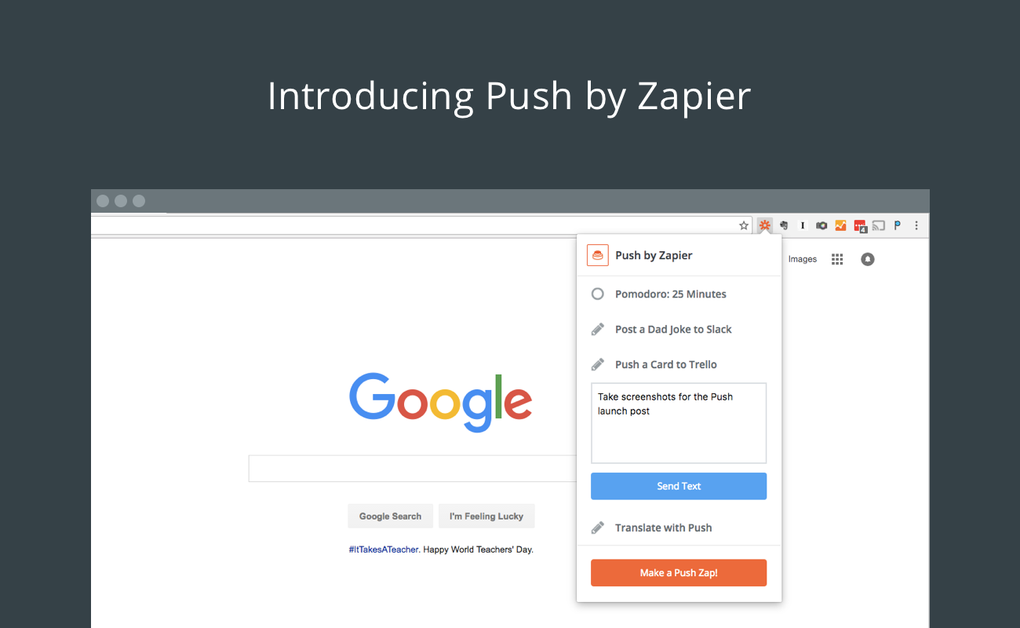
In the world of automation, Zapier has become the go‑to platform for connecting over 500 web services without writing a single line of code. While Zapier’s online dashboard excels at building “Zaps” that run silently in the background, many power users and teams often wish they could see those automations in action, test them on demand, or manually push a task with a single click. That’s where Push by Zapier steps in. This lightweight Chrome extension turns any Zap into a real‑time button that lives right inside your browser toolbar. With a single click, you can trigger a Zap, view its execution log, and even pass custom text payloads to downstream apps. The extension is especially handy for marketers who need to fire a campaign email on the spot, developers testing webhook integrations, or support agents who want to quickly create a ticket in a help‑desk system without leaving the browser. Because it lives entirely within Chrome, Push keeps the workflow close to where you’re already working—whether you’re browsing a CRM, drafting a document, or reviewing analytics. The interface is minimalistic: a tiny icon that expands into a dropdown list of your pre‑configured pushes, each labeled for easy identification. No additional software installation is required beyond the Chrome Web Store download, making it a secure and low‑maintenance addition to your automation toolbox. Whether you’re a solo freelancer or part of an enterprise team, Push by Zapier gives you visual feedback and manual control over the invisible processes that keep your business moving.
Key Features
- One‑Click Triggering: Instantly fire any Zap from the Chrome toolbar with a single mouse click.
- Two Push Types: Choose between a simple “push” (no payload) or a “push with text” that sends custom data to your Zap.
- Live Execution Log: After triggering, a concise status window shows success, failure, and any error messages returned by Zapier.
- 500+ App Integrations: Leverage Zapier’s extensive catalog—Google Sheets, Slack, Trello, Mailchimp, and more—without leaving Chrome.
- Secure OAuth Connection: Uses Zapier’s standard OAuth flow, ensuring your account credentials never leave the extension.
- Customizable Naming: Label each push with descriptive titles so you can quickly locate the right automation.
- Offline Ready UI: The UI loads instantly even on slow connections; the actual Zap execution still requires an internet connection.
- Automatic Updates: The Chrome Web Store pushes updates automatically, keeping the extension compatible with the latest Zapier API changes.
The feature set is deliberately focused on usability. By exposing only the most relevant controls—trigger, payload entry, and status feedback—Push avoids overwhelming users with unnecessary settings. Moreover, because the extension communicates directly with Zapier’s cloud via HTTPS, data transmission remains encrypted end‑to‑end. For teams that practice change‑management, the ability to manually fire a Zap on demand reduces the need to create temporary test Zaps, saving both time and subscription overhead. The “push with text” option opens creative possibilities: you can paste a marketing copy snippet, a ticket ID, or any JSON‑compatible string and have the downstream app act on it instantly. This makes Push a lightweight yet powerful companion for any workflow that benefits from occasional manual overrides or quick demos.
Installation, Setup & Compatibility
Getting Push by Zapier up and running is a straightforward three‑step process. First, visit the Chrome Web Store and click “Add to Chrome.” The extension size is under 2 MB, so the download completes in seconds on most broadband connections. After installation, a small orange Zapier icon appears to the right of the address bar. Clicking the icon opens a welcome panel that guides you through the OAuth authentication flow. You will be redirected to Zapier’s login page, where you can grant the extension permission to read your existing Zaps and create new “push” triggers. Once authorized, the extension syncs with your Zapier account and displays a list of any pre‑configured push Zaps you have created. If you haven’t built a push Zap yet, the panel includes a quick‑link to Zapier’s dashboard, where you can create a new Zap with the “Push by Zapier” trigger action.
Operating System Compatibility: Because Push is a Chrome extension, it works on any platform that supports Google Chrome or Chromium‑based browsers, including Windows 10/11, macOS 10.15+ (Catalina, Big Sur, Monterey, Ventura), Linux distributions, and Chrome OS. Mobile Chrome on Android and iOS currently does not support extensions, so Push is limited to desktop environments. The itemprop="operatingSystem" attribute reflects this cross‑platform nature: Windows, macOS, Linux, Chrome OS.
After the initial sync, you can organize your pushes into groups, rename them, or delete ones you no longer need—all from within the extension’s dropdown. When you click a push, the extension sends a request to Zapier’s API, which immediately executes the associated workflow. A small toast notification appears at the bottom‑right corner of the screen, confirming success or highlighting any errors. If you selected a “push with text,” a modal window prompts you to enter the payload before the Zap runs. The entire process typically takes less than two seconds, making it ideal for rapid testing or on‑the‑fly actions.
Pros, Cons, and Frequently Asked Questions
Pros
- Instant access to any Zap directly from the browser.
- Secure OAuth authentication eliminates the need to store passwords.
- Supports both simple pushes and custom text payloads.
- Works on all major desktop operating systems via Chrome.
- Automatic updates keep the extension compatible with Zapier’s API.
Cons
- No support for mobile Chrome browsers (Android/iOS).
- Limited to the “Push” trigger; other Zapier triggers still require the web dashboard.
- Relies on a stable internet connection for each push execution.
FAQ
Can I use Push by Zapier with a free Zapier account?
Yes. The extension works with both free and paid Zapier plans, although free accounts have a limit on the number of Zaps and tasks per month.
Is the data I send through “push with text” encrypted?
All communications between the extension and Zapier’s servers occur over HTTPS, providing end‑to‑end encryption for any payload you transmit.
Can I create a push Zap directly from the extension?
The extension itself does not create Zaps; it only lists and triggers existing “Push by Zapier” Zaps that you have built in the Zapier dashboard.
What happens if a push fails?
A failure toast appears with a brief error message, and you can click “View Details” to open the Zapier task history for a deeper dive.
Do I need to keep Chrome open for the pushes to work?
Yes. The extension runs inside Chrome, so it can only send a push request while the browser is active.
Conclusion & Call to Action
Push by Zapier fills a practical gap in the Zapier ecosystem by bringing the invisible world of background automations into the foreground of your daily workflow. Its one‑click trigger, secure OAuth flow, and clear execution feedback make it an indispensable tool for anyone who relies on Zapier for routine tasks yet occasionally needs a manual nudge. While the lack of mobile support and the focus on a single trigger type are minor drawbacks, the benefits—speed, visibility, and ease of use—far outweigh these limitations. If you’re already a Zapier user looking to tighten control over your automations, installing Push takes just a minute and instantly adds a powerful “manual override” button to your browser. For teams, the shared push list can be a quick way to standardize manual triggers across members, reducing the need for ad‑hoc scripts or separate testing environments.
Ready to see your Zaps in action? Download Push by Zapier now from the Chrome Web Store, connect your Zapier account, and start pushing your workflows with confidence.
Guides & Tutorials for Push by Zapier
How to install Push by Zapier
- Click the Preview / Download button above.
- Once redirected, accept the terms and click Install.
- Wait for the Push by Zapier download to finish on your device.
How to use Push by Zapier
This software is primarily used for its core features described above. Open the app after installation to explore its capabilities.
User Reviews for Push by Zapier 0
No reviews found




